Fake a Camera Move on a Budget
The problem
A push-in, a slow pan, a rack focus. These are the moves that make a shot feel directed instead of generated. Most people either skip them (static, lifeless) or over-ask (the model does a helicopter orbit nobody wanted). You have three ways to get a camera move, and the cheapest one is usually the best.
Option 1: Prompt the move (Runway, Kling)
The models know real camera vocabulary. Use it precisely and use one move per clip.
Terms that work reliably:
- Push in / pull out: "The camera slowly pushes in on her face."
- Pan / tilt: "The camera pans left to follow the car."
- Arc / orbit: "The camera performs a slow arc around the subject."
- Handheld: "Handheld camera, natural camera shake."
- Whip pan: "Whip pan to the door."
- Crash zoom: "Rapid crash zoom that ends in sharp focus on his eyes."
- Rack focus: "Focus shifts from the glass in the foreground to the man behind it."
Add speed and timing words: "slowly", "over the full duration", "in the last second". For multi-beat moves, Gen-4.5 accepts timestamps: [00:00] the camera holds. [00:03] it pushes in. [00:05] it settles on her hands.
In Kling, you also have camera movement presets (push, pan, tilt, roll, zoom) and a motion brush to paint which areas move and in which direction. Use the brush to keep the background static while only the subject or the camera moves.
Option 2: Fake it in the edit (guaranteed)
Generate the shot with a locked-off camera and slightly wider framing than you need. Then in your editor (DaVinci Resolve is free, CapCut works), animate scale and position over the clip: 100 percent to 108 percent over 5 seconds is a clean push-in. Add a tiny position drift and it reads as a dolly. This costs nothing, never melts the subject, and you control the exact speed curve.
Rule of thumb: prompt the moves that need parallax (arc, orbit, moving through space). Fake the ones that do not (push-in, pan on a flat plane, slow drift).
Prompt it
Moves that need parallax
- Arc
- Orbit
- Moving through space
Fake it in the edit
Moves that don’t
- Push-in
- Pan on a flat plane
- Slow drift
Option 3: Start and end frame (Kling)
Generate two stills: the framing at the start of the move and the framing at the end. Load them as first and last frame. The model builds the move between them. This is the most reliable way to get an exact end composition, for example a push-in that lands on a specific object.
Worked example
Goal: a slow push-in on a detective at a diner counter, ending on his hands around a coffee cup.
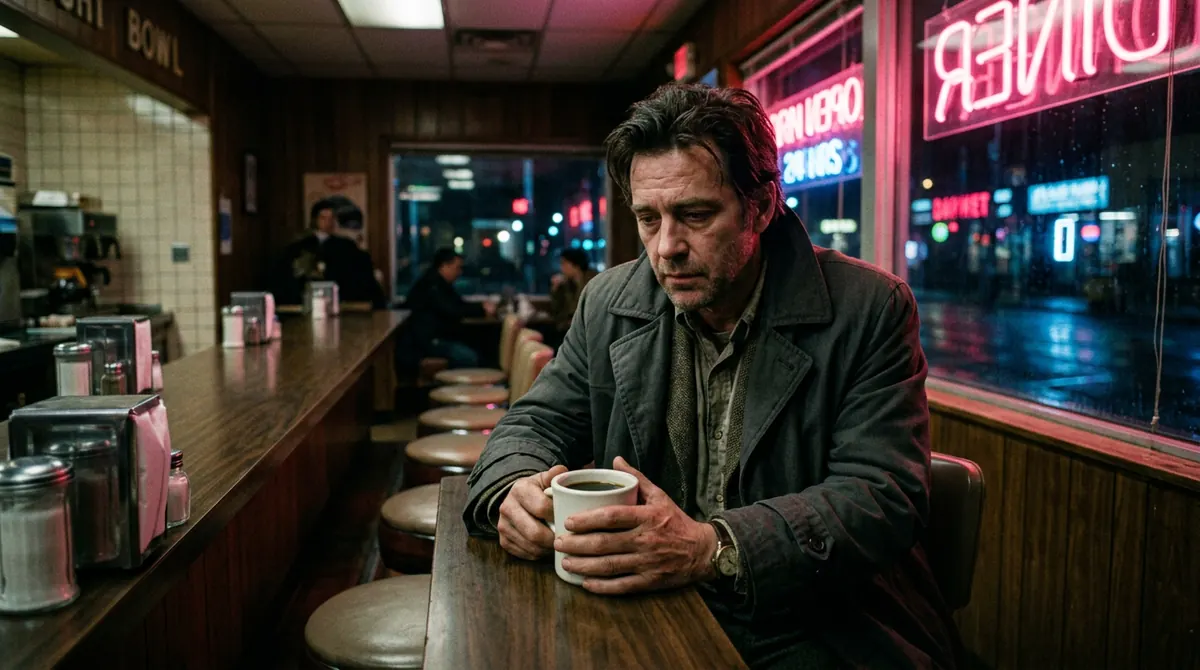
- Prompt route:
The camera slowly pushes in over the full duration, ending on his hands around the coffee cup. He does not move. Continuous, seamless shot.8 seconds. - Edit route: prompt
The locked-off camera remains perfectly still. He slowly turns the cup in his hands. Minimal subject motion only.Then scale 100 to 112 percent in the editor with the anchor point on the cup.
The edit route wins for this shot because the ending needs to land exactly on the cup, and models are approximate about endings.
Your move
Try this today
Generate one locked-off shot. Import it into your editor and give it a 5-second push-in by keyframing scale. Then generate the same shot with the push-in prompted. Put them side by side. Decide which one you would cut into a film. That decision is your rule going forward.
Stop waiting – start creating!